Microsoft Word – Complete Overview, Features & Uses
Watch This Topic On YouTube
Facebook
X
Pinterest
Digg
VK
Telegram
WhatsApp
Email
Print

Microsoft Office Word – Complete Overview, Features & Uses

Microsoft Office Word (commonly referred to as “Word”) is a powerful word-processing program developed by Microsoft. It enables users to create, edit, format, and print documents — such as letters, reports, resumes, brochures, and more — across multiple platforms (Windows, macOS, mobile and web).
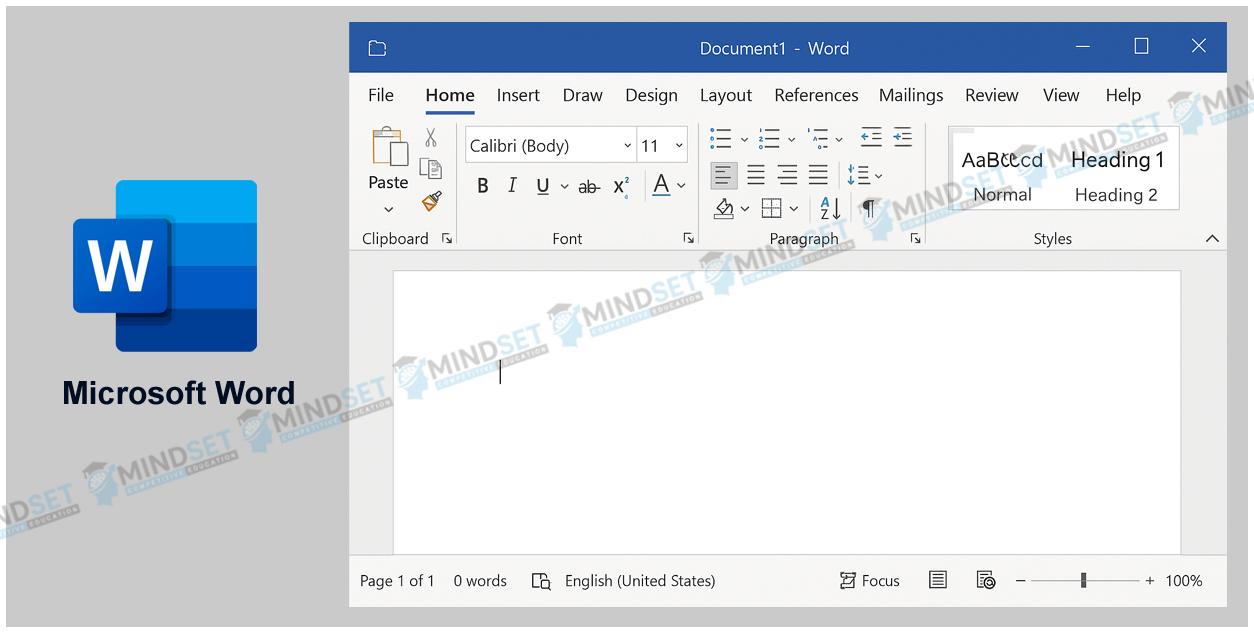
Here’s a brief but complete description of Microsoft Word, covering all essential points:

In summary: Microsoft Word is a powerful and versatile application for document creation and management — allowing you to write text, layout pages, insert multimedia, format content, collaborate, and output professional‐quality documents.

MCQ's For Exam

Q.1. What is the primary purpose of Microsoft Office Word?

  1. Creating and editing text documents
  2. Spreadsheet calculations
  3. Designing websites
  4. Video editing

1) Creating and editing text documents

📝 Description: Microsoft Word is primarily used to create, edit, and format text-based documents such as letters, reports, and resumes.

Q.2. Which of the following file extensions is most commonly associated with newer versions of Word documents?

  1. .xls
  2. .ppt
  3. .docx
  4. .pdf

3) .docx

📝 Description: .docx is the default file format used in Microsoft Word (2007 and later), based on the Office Open XML standard.

Q.3. What interface element in Word presents tabs like Home, Insert, Design, etc.?

  1. Task Pane
  2. Ribbon
  3. Menu Bar
  4. Status Bar

2) Ribbon

📝 Description: The Ribbon is the main toolbar in Word, grouping related commands under tabs for quick access.

Q.4. Which of the following is NOT a built-in review feature of Word?

  1. Spell-check
  2. Grammar check
  3. Track Changes
  4. Database query wizard

4) Database query wizard

📝 Description: Word includes spelling and grammar tools and “Track Changes,” but not a database query wizard (that’s an Access feature).

Q.5. What is the purpose of templates in Word?

  1. To run macros automatically
  2. A pre-designed document layout to save time
  3. To convert documents into spreadsheets
  4. To manage email marketing campaigns

2) A pre-designed document layout to save time

📝 Description: Templates provide ready-made document designs (like resumes or invoices) to help users start quickly.

Q.6. Which feature allows multiple users to edit the same document online in Word?

  1. Mail Merge
  2. Co-authoring
  3. Macro Recorder
  4. Table of Contents

2) Co-authoring

📝 Description: Co-authoring lets multiple people collaborate on the same document in real-time using OneDrive or SharePoint.

Q.7. Which menu in Word allows you to change page margins, orientation, and size?

  1. Insert
  2. Home
  3. Layout (or Page Layout)
  4. Review

3) Layout (or Page Layout)

📝 Description: The Layout tab manages page setup settings, including margins, page size, and orientation (portrait or landscape).

Q.8. What does the “.doc” file extension generally represent?

  1. A Word document format for older versions
  2. A PowerPoint format
  3. An Excel spreadsheet
  4. A video file

1) A Word document format for older versions

📝 Description: .doc was the default Word document format before Word 2007 introduced .docx.

Q.9. Which of the following objects can you insert into a Word document?

  1. Tables
  2. Charts
  3. Images
  4. All of the above

4) All of the above

📝 Description: Word supports inserting tables, charts, pictures, shapes, and other multimedia for rich document formatting.

Q.10. What is the “Backstage” view in Word (accessed via File tab)?

  1. Where you edit paragraphs
  2. Interface for opening, saving, printing, and sharing documents
  3. A special font library
  4. A video export setting

2) Interface for opening, saving, printing, and sharing documents

📝 Description: The Backstage view provides file-level operations such as saving, printing, exporting, and document info management.

Q.11. Word allows you to automatically generate a Table of Contents based on what?

  1. Number of pages
  2. Imported images
  3. Heading styles used in the document
  4. File size

3) Heading styles used in the document

📝 Description: Word uses heading styles (Heading 1, 2, 3, etc.) to generate an automatic, clickable Table of Contents.

Q.12. Which of the following is TRUE about Word’s cloud integration?

  1. You must always save locally
  2. You can only use Word offline
  3. You can save to OneDrive and collaborate in real time 
  4. Word cannot be used with less than 8 GB RAM

3) You can save to OneDrive and collaborate in real time

📝 Description: Modern versions of Word integrate with OneDrive, allowing users to sync and co-edit documents across devices.

Q.13. Which platform versions does Microsoft Word support?

  1. Only Windows
  2. Windows and macOS
  3. Windows, macOS, mobile, and web
  4. Linux only

3) Windows, macOS, mobile, and web

📝 Description: Word runs on multiple platforms, including Windows, macOS, Android, iOS, and web browsers via Office 365.

Q.14. In Word, what is the “Track Changes” feature used for?

  1. Running spreadsheet macros
  2. Recording voice notes
  3. Monitoring edits made by different reviewers
  4. Embedding charts from Excel

3) Monitoring edits made by different reviewers

📝 Description: Track Changes highlights insertions, deletions, and formatting changes made by reviewers in a shared document.

Q.15. What key advantage does Word’s template and theme support provide?

  1. Automatically generating video content
  2. Ensuring consistent design and faster document creation
  3. Managing servers remotely
  4. Converting text to audio files

2) Ensuring consistent design and faster document creation

📝 Description: Templates and themes maintain consistent formatting across documents, improving design quality and efficiency.

Sharing is caring:

Facebook
X
Pinterest
Digg
VK
Telegram
WhatsApp
Email
Print

Contact For Assistance

Give Your Suggestion

Microsoft Office Word - A Complete Course With 1500+ MCQ's

DOWNLOAD NOW
error: Content is protected !!

IMPORTANT NOTICE

We are MindSet Competitive Education Team/ Family. We are currently uploading our course contents continuously to complete and to lunch the website for you all as soon as possible. But we are continuously update course contents/topics from START, so you can stat your Competitive Preparation Journey from start to end step by step.
Anybody Interested To Join Our Courses(Free For All) and get everyday updates on courses/topics/Current affairs.